






Analyzing AI-SERP features: how to measure your visibility


As a result, you don't know exactly which effort is yielding what. And so that has to be solved.
In this article, I'm going to tell you all about that.
A payment provider is nothing but a party that facilitates a digital payment. The most well-known examples are Mollie, Multisafepay and Adyen.
Payment providers then enable payment via iDeal, Klarna, bank transfer, Bancontact and a host of other payment options.
In short, no webshop can do without it.
[optin-monster-shortcode id="c1eay1r8pq0dafpe191m"]]
The answer to this question is actually super simple. When you land on a website via Google, Google Analytics sees it as organic traffic.
When you visit a website via a link from another website, Google Analytics counts this as a referral. And if you click on a Google Ads ad, Google counts this as Paid Search, unless it’s a Performance Max campaign. In that case, Google counts this as cross-network traffic.
That all makes a lot of sense.
If you landed on an online store via Google and then want to make the payment, you will be redirected to the payment environment of the payment provider.
You then complete the payment, after which you are redirected to the thank-you page. Google Analytics will no longer recognize that you initially arrived at the website via Google, because you returned via the payment provider’s payment environment.
Google Analytics treats this as two separate sessions and therefore reports that the revenue comes from the payment provider (i.e., a referral) rather than from Google. This results in inaccurate data in your reports.

Step 1: Log into Google Analytics
Step 2: Click on the account and on the property where you want to add the referral exclusion.
Step 3: Click on "Manage" (the cogwheel) at the bottom left.
Step 4: Click on "Data Streams.
Step 5: Click the appropriate data stream.
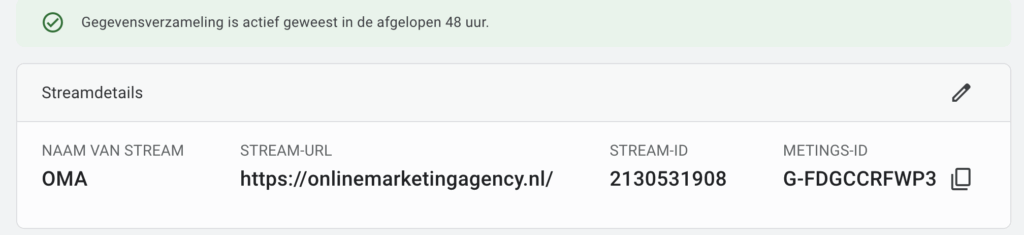
Step 6: click on 'Set Tag Settings' at the bottom and then 'Show All'


Step 7: Click "Create a list of unwanted references.

Step 8: Enter all the payment providers below there until you have had the complete list:

3ds.bnpparibas.com
3dsecure.icicibank.com
3dsecure.icscards.com
abnamro.com
acs2.swedbank.se
acs4.3dsecure.no
asnbank.nl
banking.ideal.ing.nl
belgium-3dsecure-uvg.wlp-acs.com
belgium-3dsecure.wlp-acs.com
belgium-uvj-3dsecure.wlp-acs.com
pay.rabobank.com
bitpay.com
cap.attempts.securecode.com
cap.securecode.com
checkout.buckaroo.com
services.asnbank.nl
services.regiobank.nl
giropay.sparkasse-lev.de
ideal.asnbank.nl
ideal.bunq.com
ideal.bunq.nl
ideal.ing.nl
ideal.knab.nl
ideal.regiobank.nl
ideal.snsbank.nl
ideal.triodos.nl
ideal.vanlanschot.com
live.adyen.com
mollie.com
multisafepay.com
mycardsecure.com
pay.mollie.com
pay.multisafepay.com
pay.com
payment-web.sips-atos.com
paypal.com
regiobank.co.uk
secure.curopayments.net
secure.ogone.com
secure5.arcot.com
securecode.abnamro.nl
securecode.com
securesuite.co.uk
securesuite.net
secureyou3d.ing.be
sicher-einkaufen.commerzbank.de
sicheres-bezahlen.bw-bank.de
snsbank.co.uk
sparkasse-lev.de
tsys.arcot.com
verifiedbyvisa.com
wlp-acs.com
Update: Unfortunately, there is a maximum number of lines you can add to this configuration and you may still have a handful of referrals coming through in Google Analytics 4. This is not ideal and you obviously want to get this fixed. Therefore, what you can do in that particular case is to adjust the configuration. Instead of manually adding all of the above URLs, it's best to work with a Regular Expression. This is because then you bypass the maximum number of URLs. In that case, your configuration will look like this:
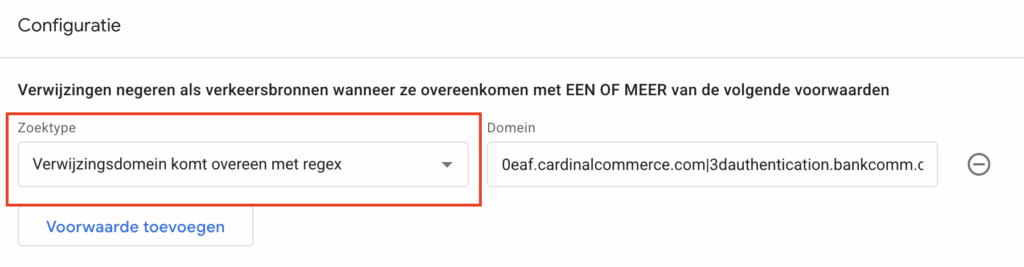
Under “Domain,” we’re now going to add a whole bunch of links as regular expressions. For this, I’d like to refer you to the file containing the RegEx URLs.
Follow the instructions and paste all the URLs as specified under “Domain”—and voilà!
Step 9: After filling everything in, all you have to do is click 'Save'.
And now you've excluded the most common payment providers with Google Analytics.
Google Analytics sees payment through a payment provider as a new session. This makes it look like the conversion came through the payment provider instead of the original source, such as Google. This distorts your data.
Log into your GA4 account, go to "Data Streams," click "Set Tag Settings," and choose "Create a list of unwanted referrals. Add the payment providers to the list and save the settings.
If you don't exclude payment providers, conversions are wrongly assigned to them instead of the actual traffic source. This creates a distorted picture of your marketing efforts and results.
After excluding payment providers, conversions are correctly assigned to the original traffic source. This gives you better insight into which marketing efforts actually lead to sales.
Daniel is the founder of Online Marketing Agency. He constantly scours the Internet for the latest gadgets and tactics and blogs about them in understandable language. Well, sometimes.



4 Responses to "Exclude payment providers in Google Analytics 4"
Thanks for the tutorial. However, there seems to be a max to the unwanted references? I cannot add the last three. Then the Add Condition button becomes inactive.
Hi Dennis,
That may be correct! I would then take a close look at which provider you are seeing back in Analytics. I would then add those and remove some that your clients don't use.
Nice overview. One important one I'm still missing is pay.klarna.com. This one occurs with a lot of my e-commerce clients.
True! This list could definitely use an update. And it will include Klarna.